Types of Cloud Computing Applications (Part - 1)

 IT systems are really a stack of different components:

  • At the bottom is the infrastructure layer, the actual hardware that runs everything.
  • Next comes an operating system, allowing software applications to easily access the hardware components.
  • Finally, there is the application itself, providing a user interface and performing a specific purpose.

There are cloud offerings for each part of this stack.

What Is IaaS?

Infrastructure as a Service (IaaS) offers basic components, giving access to virtualized servers or storage so that end users can build systems from the ground up. Simplified, that means IaaS provides a virtual server that the customer rents from another company that has a data center. IaaS promotes access versus ownership and gives the end user flexibility when it comes to hosting custom-built apps while also providing a general data center for storage.

What Is PaaS?

Platform as a Service (PaaS) provides some sort of operating system, allowing end users to avoid some of the steps in organizing infrastructure and move right into software development. A PaaS provider offers a company physical IT infrastructure, such as data centers, servers, storage and network equipment, plus an intermediate layer of software, which includes tools for building apps. And, of course, a user interface is also part of the package to provide usability.

What Is SaaS?

Software as a Service (SaaS) is the final stage, providing an end user with a piece of software that typically runs in a browser rather than being hosted locally. This means software can be accessed from any device with an internet connection and web browser. Customers deploy SaaS offerings in a cloud deployment model, as described below.

These three basic offerings have spawned countless other “as a service” solutions. Part of the challenge involved with cloud computing is sorting through these many offerings and figuring out which ones are the best match for the company. Inevitably the end result will include pieces from multiple parts of the stack.

Along with the primary cloud service types, there are three primary cloud deployment models which I will be posting in my next post.
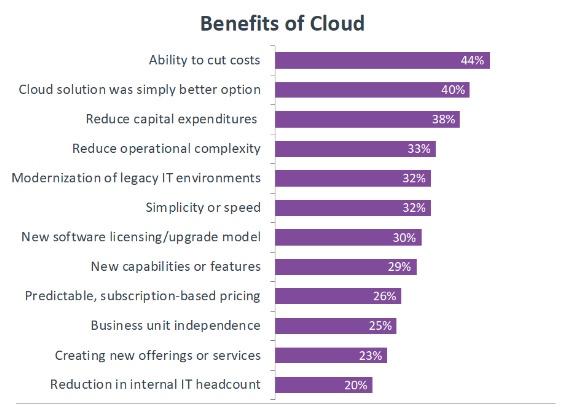
Benefits of Cloud Computing

 As with most new technology models, the initial benefit that companies look for with cloud computing is the ability to cut costs. For many years, the corporate approach to IT has been to treat it as a cost center, so CIOs and IT pros are always looking for ways to provide the same level of service at lower costs.

While cloud computing can provide direct cost savings in some cases, certain applications can actually be more expensive to run in the cloud, thanks to performance and security requirements. However, cloud computing provides many other benefits that are attractive to companies as they become more strategic with technology.

As technology is integrated more into the business, there are new requirements for how technology is managed. There is more of a shift toward operating expenditure versus capital expenditure, or there is a stronger desire to reduce overhead and operational complexity. Cloud computing helps with these goals, and for many companies, moving to the cloud simply becomes the best infrastructure option.


Cloud Computing Definition

 In thinking about a cloud computing definition, we have to consider the five characteristics that the National Institute of Standards and Technology (NIST) outline as an essential part of any cloud system:

  • Broad Network Access: This characteristic is common with other models and simply means that cloud services require networked connections between backend infrastructure (such as servers and storage) and frontend clients (such as laptops or smartphones).
  • Resource Pooling: In many cases, this involves virtualized resources, but in some cases, physical resources themselves are pooled together with a layer of software.
  • Rapid Elasticity: Here cloud computing services begin to drastically separate from other models. Rather than simply grouping resources into static pools, cloud resources can dynamically grow and shrink depending on the workload demands.
  • On-Demand Self-Service: In contrast to other models that require significant technical expertise to spin up, cloud services have simple methods that allow users with relatively limited technical skills to create or access resources.
  • Measured Service: Given the dynamic nature of cloud computing, the final characteristic is the ability to measure exactly how much resource is being used, which leads to the ability to charge for exact usage rather than purchasing or renting for a broad period of time.
Initially, companies only leveraged some of the unique characteristics. For instance, a company may have migrated some on-premises applications to a cloud provider, offloading the maintenance work needed for local servers. Over time, companies have begun exploring the more advanced aspects of cloud computing, using flexible development environments to build new applications or implement robust storage solutions.

A Short brief about Advanced Persistence Threat

Advanced Persistence Threat, these groups are not an individual identity. They are mostly organizations or countries (based on agenda/political reasons) with expertise teams. Not a normal expert, they are trained professionals and they have the potential to break in any systems and move laterally in a LAN without being caught for years.

Even your antivirus cannot detect this movement, because they do not create malwares, they just abuse genuine applications (like PowerShell) and move laterally like a genuine process.

Key components of an APT is, moving laterally, being persistence, create CnC channel, getting payload with just a DNS request and more. Every APT attacks so far recorded, they do have uniqueways of propagating a network and they rely highly on open ports, unprotected network zones, vulnearables applications, network shares,etc. Once they break in, they do whatever they intend to do.

Types of SOC

 Categorize SOCs that are internal to the constituency into five organizational models of how the team is comprised,

1. Security team.

No standing incident detection or response capability exists. In the event of a computer security incident, resources are gathered (usually from within the constituency) to deal with the problem, reconstitute systems, and then 16 stands down.

Results can vary widely as there is no central watch or consistent pool of expertise, and processes for incident handling are usually poorly defined. Constituencies composed of fewer than 1,000 users or IPs usually fall into this category.

2. Internal distributed SOC.

A standing SOC exists but is primarily composed of individuals whose organizational position is outside the SOC and whose primary job is IT or security related but not necessarily CND related.

One person or a small group is responsible for coordinating security operations, but the heavy lifting is carried out by individuals who are matrixed in from other organizations. SOCs supporting a small- to medium-sized constituency, perhaps 500 to 5,000 users or IPs, often fall into this category.

3. Internal centralized SOC.

A dedicated team of IT and cybersecurity professionals comprise a standing CND capability, providing ongoing services.

The resources and the authorities necessary to sustain the day-to-day network defense mission exist in a formally recognized entity, usually with its own budget. This team reports to a SOC manager who is responsible for overseeing the CND program for the constituency. Most SOCs fall into this category, typically serving constituencies ranging from 5,000 to 100,000 users or IP addresses.

4. Internal combined distributed and centralized SOC.

The Security Operations Center is composed of both a central team (as with internal centralized SOCs) and resources from elsewhere in the constituency (as with internal distributed SOCs). Individuals supporting CND operations outside of the main SOC are not recognized as a separate and distinct SOC entity.

For larger constituencies, this model strikes a balance between having a coherent, synchronized team and maintaining an understanding of edge IT assets and enclaves. SOCs with constituencies in the 25,000–500,000 user/IP range may pursue this approach, especially if their constituency is geographically distributed or they serve a highly heterogeneous computing environment.

5. Coordinating SOC.

The SOC mediates and facilitates CND activities between multiple subordinate distinct SOCs, typically for a large constituency, perhaps measured in the millions of users or IP addresses.

A coordinating SOC usually provides consulting services to a constituency that can be quite diverse.

It typically does not have active or comprehensive visibility down to the end host and most often has limited authority over its constituency.

Coordinating SOCs often serve as distribution hubs for cyber intel, best practices, and training. They also can offer analysis and forensics services, when requested by subordinate SOCs.

A short brief about Security Operations Center


What Is a Security Operations Center (SOC) ?

A SOC is a team primarily composed of security analysts organized to detect, analyze, respond to, report on, and prevent cybersecurity incidents.

The practice of defense against unauthorized activity within computer networks, including monitoring, detection, analysis (such as trend and pattern analysis), and response and restoration activities.

There are many terms that have been used to reference a team of cybersecurity experts assembled to perform CND.

They include: ‚

  • Computer Security Incident Response Team (CSIRT) ‚
  • Computer Incident Response Team (CIRT) ‚
  • Computer Incident Response Center (or Capability) (CIRC) ‚
  • Computer Security Incident Response Center (or Capability) (CSIRC) ‚
  • Security Operations Center (SOC) ‚
  • Cybersecurity Operations Center (CSOC)
  • ‚ Computer Emergency Response Team(CERT)

In order for an organization to be considered a SOC, it must:

  • 1. Provide a means for constituents to report suspected cybersecurity incidents
  • 2. Provide incident handling assistance to constituents
  • 3. Disseminate incident-related information to constituents and external parties.

Types of logs in windows ?

 In specific with windows logs are three type system, security, and application

Application log

Each application will have their logs, which will be triggered when it contains errors or warning will be sent to SOC for review.

Security log

Suspicious User activities for account success and failure logins will be logged and process creation, termination for each and every file accessed by user account logged will be logged into this category.

System log

Logs which footprinting the process of kernel boot, driver updates or failure, windows update and more interesting things will be logged into system log category.

Since security is our concern, we will discuss security logs, look below the figure for better understanding, In this screenshot analyst is analyzing a log for windows event sources.

SIEM better visibility for analyst

As I told earlier Siem is built for visibility so, whatever security issues happening with end users should be triggered to Security operation center.

In the above picture, an analyst has clear visibility of end user activities.In this, we can see the event id is 4720.

When a new user account is created for domain accounts or local SAM accounts.Event logs will be established with event id 4720 with respect to new user account creation.