Showing posts with label Cloud Concepts. Show all posts

Seeing How You Can Service Your Cloud Network

 Services and apps that float among the cloud are similar in many ways to the services and apps that remain grounded in your on-premises infrastructure. Take cloud-based web apps and directory services, for example. Many will use the same ports and protocols that are used by their on-premise counterparts. Management tools, whether CSP-based, third-party or those built by your IT team, will also utilize port and protocol requirements.

If you decide to make the jump from the ground to the cloud, you will need to review your ports to determine what needs to be based in the cloud and what needs to remain housed on your own infrastructure. Take a close look at what needs internet access, in order to communicate with outside services or apps, and what type of access is required from inside the cloud.

Once you narrow it down, you can configure firewalls and set the necessary filters to ensure your cloud network will remain secure. As you work to deploy your cloud network, make sure you consult the following resources:

  • App and service configuration guides to identify the necessary ports and protocols each one uses.
  • CSP security and deployment guides or white papers to locate the ports and protocols you need to access cloud services such as websites, databases, directory services and so on.
  • Third-party deployment guides that are similar to the cloud network you are implementing.
  • Your own (yes, your own) documentation to reference your firewall, routing, and other related information that could help you understand your own port and protocol usage. It will be tough to implement a successful cloud deployment if you have no idea from where you are jumping.
  • If the fates forbid you from uncovering what ports and protocols are used by a legacy application that you want moved to the cloud, you might want to gather some helpful tools such as a port scanner or protocol analyzer to unlock the guarded secrets of your predecessors.

Before launching any cloud network, take a look through all your apps and services to ensure all ports and protocols are toeing the line.
Peek in to Prep Your Cloud Network’s Ports and Protocol

 One of the key steps you need to take to secure your cloud network is drilling down into the nitty gritty to uncover what people, services and technologies need access to the network. Ports are an essential part of your cloud network. The port is the endpoint of your connection.

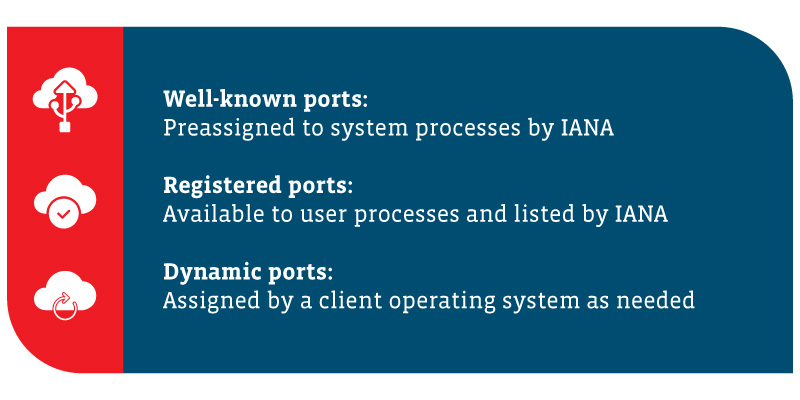
Users connect to the cloud network through a designation port. All ports are assigned a number ranging from 0 to 65,535. The Internet Assigned Numbers Authority (IANA) separates port numbers into three ports, based on their numbers. TCP and UDP ports are assigned based on these ranges. Hackers commonly go after well-known ports but have been known to target open registered or dynamic ports, as well.

The three ports are:

  • Well-known Ports
    Pre-assigned to system processes by IANA, these include 0 to 1,023 and are most prone to attacks.
  • Registered Ports
    Available to user processes and listed by IANA, these registered ports go from 1,024 to 49,15 and are known to be too system-specific for direct target by hackers. However, hackers sometimes scan for open ports in this range. Don’t turn your back, but you can avert your gaze occasionally.
  • Dynamic or Private Ports
    Assigned by a client operating system as needed, these are the ports numbered from 49,152 to 65,535. Dynamic ports are constantly changing (hence, the name dynamic), so it is difficult to directly target numbers. But again, hackers have been known to scan for open ports. As far as watching for hackers is concerned, maybe you can turn your back on dynamic or private ports, but not for too long!
Alt: A summary of the three types of cloud network ports: 1) Well-known ports: preassigned to system processes by IANA 2) Registered ports: available to user processes and listed by IANA 3) Dynamic ports: assigned by a client operating system as needed

So, what are these ports used for? Here is a list of some of the most common default network ports used in the tech world:

  • 21 FTP (File Transfer Protocol)
  • 22 SSH (Secure Shell)
  • 25 SMTP (Simple Mail Transfer Protocol)
  • 53 DNS (Domain Name System)
  • 80 HTTP (Hypertext Transfer Protocol)
  • 110 POP3 (Post Office Protocol)
  • 139 NetBIOS Session Service
  • 143 IMAP (Internet Message Access Protocol)
  • 443 HTTPS (Hypertext Transfer Protocol Secure)
  • 3389 RDP (Remote Desktop Protocol)

Surveying Network Configuration Options

 If you want to make use of a virtual network, you must also configure the following components:

  • Subnets
    Subnets are a required part of a virtual network. You need TCP/IP subnets, which will designate addresses that are used on that network. Public and private address ranges are often used. When that’s not possible, addresses are often assigned by CSPs. Virtual networks can be segmented into one or more subnets.
  • Routers or Routing Tables
    For any network, you must configure routers or routing tables on any virtual machine connected to the network so that packets can be routed appropriately.
  • DNS
    DNS server addresses must be provided, either assigned by you or your CSP.
  • CSP Region or Zones
    Virtual networks operating in different CSP regions must be specified. Doing so will also allow you to connect virtual networks in different regions. If needed, you can configure isolation between regions as well.
  • Traffic Filters
    Configuring your traffic filters to the specifications of your security protocols will only allow approved traffic to pass through your network. Filters can be applied at NIC in virtual machines, to a subnet or to a cloud service. When necessary, you will do this with a network virtual appliance.

Glancing at the Building Blocks of Your Cloud Network

 As a cloud administrator or cloud computing engineer, your ability to create a virtual network will typically be reliant on virtual machine software or a cloud network provided by a CSP. Virtual machine software allows cloud administrators to designate and configure virtual network parameters associated with a host’s physical Network Interface Card (NIC). When you configure multiple hosts to operate using the same parameters, you are adding those hosts to the virtual network. Virtual networks must have the following components:

  • Virtual Switch
    Virtual switches give you the capability to create segments on your network and connect those components together. You can connect one or more virtual machines to a virtual switch.
  • Virtual Bridge
    This component allows you to connect virtual machines to the LAN used by the host computer. The virtual bridge connects the network adapter on the virtual machine to the physical NIC on the host computer. Multiple virtual bridges can be configured to connect to multiple physical NICs.
  • Virtual Host Adapter
    The adapter makes it possible for your virtual machines to communicate with the host. Virtual host adapters are common in host-only and Network Address Translation (NAT) configurations. These cannot connect to an external network without a proxy server.
  • NAT Service
    NAT services allow multiple devices within your cloud network to connect to the internet.
  • DHCP Server
    The DHCP server allocates IP addresses to virtual machines and hosts. This applies to host-only and NAT configurations.
  • Ethernet Adapter
    This is a physical network adapter installed on hosts that connect to the network.

Many CSPs provide cloud services that make it easier to configure virtual networks and cloud networks. With cloud networks, you configure your virtual network and add your resources to them, rather than configuring them at the virtual machine level. Cloud networks also typically offer capabilities to simplify monitoring, management, connections and security.


What Is a Virtual Network?

 Virtual networks can be thought of as separate networks within a larger network. Administrators can create a separate network segment consisting of a range of subnets (or a single subnet) and control traffic that flows through the cloud network. Depending on your business needs, you can implement your network using cloud technology from a cloud service provider (CSP).

The key difference for cloud administrators and architects when it comes to designing cloud networking solutions is the amount of control needed to have over the hardware. When you implement cloud networking with a CSP, you have little control over — and likely little knowledge about — the design of the CSP’s network. Because of this limitation, virtual networks are often the go-to choice when you want to provide secure network isolation.

With a cloud solution, these virtual networks are known as VNets or Virtual Private Clouds (VPC). These act as a representation of a network in the cloud, giving you a cloud network.

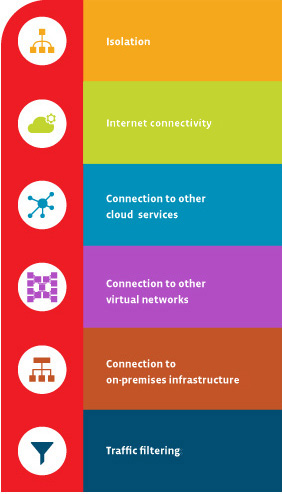
Virtual networks provide the following benefits:

A table showing the six benefits of virtual networks: isolation, internet connectivity, connection to other cloud services, connection to other virtual networks, connection to on-premises infrastructure and traffic filtering.
  • Isolation
    You can keep networks isolated from one another to ensure security and for purposes of development, quality assurance and deployment of cloud networks.
  • Internet Connectivity
    Each virtual network can be configured to access or deny access to the internet, or to limit access to specific destinations on the internet if needed.
  • Connection to Other Cloud Services
    Virtual networks often need a connection to CSP services. This allows the network to utilize services offered by the CSP. Providers typically allow for configuration of routing tables, domain name resolution, firewall and related items to manage the connections to your virtual networks.
  • Connection to Other Virtual Networks
    This allows you to interconnect your virtual networks when necessary while maintaining control over connections.
  • Connection to On-Premises Infrastructure
    Part of the flexibility of a virtual network is the ability to control connections. You can connect your virtual network to on-premises systems. Often this type of configuration is for end users to access a secure private cloud network or done as part of a hybrid cloud implementation.
  • Traffic Filtering
    Most secure connections involve filtering. Normally, this involves filtering items by source IP address and port, destination IP address and port, and particular protocol. This gives cloud computing engineers increased control over the communications occurring on your network.

Cloud Computing Jobs and Careers

 With a technology as far-reaching as cloud computing comes a wide range of jobs that require up-to-date cloud skills. While some of the roles are new positions that focus primarily on cloud usage, most are existing roles that need to add cloud expertise to ongoing responsibilities.

These roles include:

  • Server Administrator: One of the most common IT roles, the responsibilities of a server administrator include overall management of physical servers, virtual servers and business systems. This role might also be labeled systems administrator in some companies, and while the exact scope may differ between roles, the general concept is similar. Obviously in today’s environment, individuals in this role need a solid working knowledge of cloud computing systems as they determine which platform is best for each application and manage the entire architecture.
  • Cloud Architect: Mostly seen in large companies with extensive needs, cloud architect is a newer role that focuses specifically on cloud resources and less on a traditional server room. Typical tasks might include cloud vendor analysis, private cloud construction and cloud orchestration. As more IT architectures become combinations of cloud resources and on-premises resources, this role may fade in favor of the more general systems administrator or systems architect.
  • Software Developer: Some of the greatest disruption caused by cloud computing has been in the software development space, with barriers to entry being removed and workflow changing drastically thanks to new capabilities. The increased demand for software is driving granularity in software positions. Some of the more popular job titles are front-end developer, full stack developer and DevOps engineer.
  • Data Scientist: Along with an understanding of new data tools and corporate data structures, data scientists must have expertise with cloud systems since cloud resources are practically a requirement for modern data processing and analysis. The first step is leveraging various storage options to create a comprehensive data repository. From there, data scientists typically employ cloud software, especially tools from the catalog of major public cloud providers.

Types of Cloud Computing Applications (Part-2)

The three primary cloud deployment models as said in my previous post are mentioned below.

Public Cloud

Although many people apply the label cloud computing to any third-party resource, a true instance of public cloud will use a software layer to ensure elasticity and measured self-service, rather than simply taking over the manual work involved in standing up IT systems.

Private Cloud

Companies can build private clouds using their own IT infrastructure. Once again, the differences between a standard server room and a true private cloud are the unique cloud computing characteristics, and these can be added with a layer of software that a company might build themselves or purchase from a vendor.

Hybrid Cloud

Hybrid cloud typically refers to a single application, which may be configured across both public cloud resources and a private cloud, using external resources if the workload becomes too great to be handled internally. Multi-cloud is a similar term that typically refers to an overall architectural approach, where different applications reside on a public cloud model or a private cloud model depending on the requirements, and the entire architecture must be optimized and managed.

For a technology as transformative as cloud computing, companies will go through stages of adoption:

  • The experiment phase is primarily about exploration and education.
  • When an organization is ready to take the first step, the non-critical use stage is where they will migrate one of their peripheral systems to the cloud to learn about cloud operations and integration.
  • Once they are comfortable understanding the pros and cons, they will move to the full production stage, where they will evaluate each one of their systems to determine where it should be placed in a multi-cloud architecture.
  • Finally, they reach the transformed IT stage, where they have not simply migrated legacy applications but have rebuilt pieces as needed to take full advantage of cloud computing capabilities.

Types of Cloud Computing Applications (Part - 1)

 IT systems are really a stack of different components:

  • At the bottom is the infrastructure layer, the actual hardware that runs everything.
  • Next comes an operating system, allowing software applications to easily access the hardware components.
  • Finally, there is the application itself, providing a user interface and performing a specific purpose.

There are cloud offerings for each part of this stack.

What Is IaaS?

Infrastructure as a Service (IaaS) offers basic components, giving access to virtualized servers or storage so that end users can build systems from the ground up. Simplified, that means IaaS provides a virtual server that the customer rents from another company that has a data center. IaaS promotes access versus ownership and gives the end user flexibility when it comes to hosting custom-built apps while also providing a general data center for storage.

What Is PaaS?

Platform as a Service (PaaS) provides some sort of operating system, allowing end users to avoid some of the steps in organizing infrastructure and move right into software development. A PaaS provider offers a company physical IT infrastructure, such as data centers, servers, storage and network equipment, plus an intermediate layer of software, which includes tools for building apps. And, of course, a user interface is also part of the package to provide usability.

What Is SaaS?

Software as a Service (SaaS) is the final stage, providing an end user with a piece of software that typically runs in a browser rather than being hosted locally. This means software can be accessed from any device with an internet connection and web browser. Customers deploy SaaS offerings in a cloud deployment model, as described below.

These three basic offerings have spawned countless other “as a service” solutions. Part of the challenge involved with cloud computing is sorting through these many offerings and figuring out which ones are the best match for the company. Inevitably the end result will include pieces from multiple parts of the stack.

Along with the primary cloud service types, there are three primary cloud deployment models which I will be posting in my next post.

Benefits of Cloud Computing

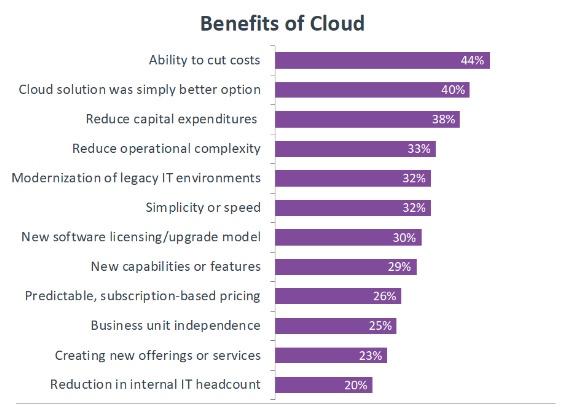
 As with most new technology models, the initial benefit that companies look for with cloud computing is the ability to cut costs. For many years, the corporate approach to IT has been to treat it as a cost center, so CIOs and IT pros are always looking for ways to provide the same level of service at lower costs.

While cloud computing can provide direct cost savings in some cases, certain applications can actually be more expensive to run in the cloud, thanks to performance and security requirements. However, cloud computing provides many other benefits that are attractive to companies as they become more strategic with technology.

As technology is integrated more into the business, there are new requirements for how technology is managed. There is more of a shift toward operating expenditure versus capital expenditure, or there is a stronger desire to reduce overhead and operational complexity. Cloud computing helps with these goals, and for many companies, moving to the cloud simply becomes the best infrastructure option.


Cloud Computing Definition

 In thinking about a cloud computing definition, we have to consider the five characteristics that the National Institute of Standards and Technology (NIST) outline as an essential part of any cloud system:

  • Broad Network Access: This characteristic is common with other models and simply means that cloud services require networked connections between backend infrastructure (such as servers and storage) and frontend clients (such as laptops or smartphones).
  • Resource Pooling: In many cases, this involves virtualized resources, but in some cases, physical resources themselves are pooled together with a layer of software.
  • Rapid Elasticity: Here cloud computing services begin to drastically separate from other models. Rather than simply grouping resources into static pools, cloud resources can dynamically grow and shrink depending on the workload demands.
  • On-Demand Self-Service: In contrast to other models that require significant technical expertise to spin up, cloud services have simple methods that allow users with relatively limited technical skills to create or access resources.
  • Measured Service: Given the dynamic nature of cloud computing, the final characteristic is the ability to measure exactly how much resource is being used, which leads to the ability to charge for exact usage rather than purchasing or renting for a broad period of time.
Initially, companies only leveraged some of the unique characteristics. For instance, a company may have migrated some on-premises applications to a cloud provider, offloading the maintenance work needed for local servers. Over time, companies have begun exploring the more advanced aspects of cloud computing, using flexible development environments to build new applications or implement robust storage solutions.

Solution for Question 1 :

The traditional ways of providing IT infrastructure are used by both small and large IT organizations. That means that any IT firm requires a server room, which is a basic requirement of the industry. A database server, mail server, networking, firewalls, routers, modem, switches, high net speed, and maintenance engineers should all be present in the server room.
We’ll have to spend a lot of money to build such an IT infrastructure. Cloud Computing was created to address all of these issues while also lowering the cost of IT infrastructure. We have access to a shared pool of computer resources (servers, storage, programs, and so on) in the cloud. All you have to do is ask for more resources when you need them. The cloud makes provisioning resources quickly a piece of cake. When resources are no longer required, they can be released. You just pay for what you use this way. All maintenance will be handled by your cloud provider. 

Solution for Question 2 :

Web Page: A text file produced in any markup language, such as HTML, is referred to as a web page. Hypertext, simple text, sound, photos, videos, and links to other pages are all included on the web page (hyperlinks).
Websites: A collection of similar web pages linked together via hyperlinks.
Browsers: Browsers are computer programs that search for, access, and display various websites on the Internet. Mozilla Firefox, Chrome, and so forth.
URL: Each website’s main page has its own unique address. Uniform Resource Locator is the name given to this one-of-a-kind address.

Solution for Question 3 :

The advantages of cloud computing are:
1. When needed, service is available 24*7.
2. In terms of data loss, security is important. (When critical data is lost, cloud computing provides excellent security.) Because the data is saved in the system, it can be quickly accessible even if your computer fails.).
3. Resource pooling
4. Services- pay- per use model
5. Shared Infrastructure
6. Cost Reduction
7. In the event of a disaster, it is highly advised that firms have an emergency backup plan in place. Businesses can use cloud storage as a backup plan by storing a second copy of crucial files. These files are kept in a remote place and can only be accessed via the internet.

Solution for Question 4 :

Although Wi-Fi and the Internet are closely related and are frequently used interchangeably, there are significant differences between the two. The Internet is a wide area network (WAN) that uses a set of protocols to send data between networks and devices all over the world. Wi-Fi, on the other hand, is only a way to link devices without the use of cables.
If you don’t have a modem or Internet subscription from an ISP, you can have a Wi-Fi connection but no Internet access. As a result, the signal strength of a Wi-Fi network is unrelated to the Internet speed that a user may experience when connected.

Solution for Question 5 :


Wired NetworkWireless Network
1.A wired network employs wires to link devices to the Internet or another network, such as laptops or desktop PCs.“Wireless” means without wire, media that is made up of electromagnetic waves (EM Waves) or infrared waves. Antennas or sensors will be present on all wireless devices
2. Faster transmission speed Slow transmission speed 
3.Propagation delay is LowPropagation delay is high
4.More Secure & hence ReliableLess Secure & hence less Reliable
5.Devices must be hard-wiredInstallation is Quick
6.Less ExpensiveMore Expensive
7.High installation & maintenance cost Low installation & maintenance cost 
8.Hub, Switch, etc. devices are usedWireless routers, access points, etc. are used.

Cloud service models

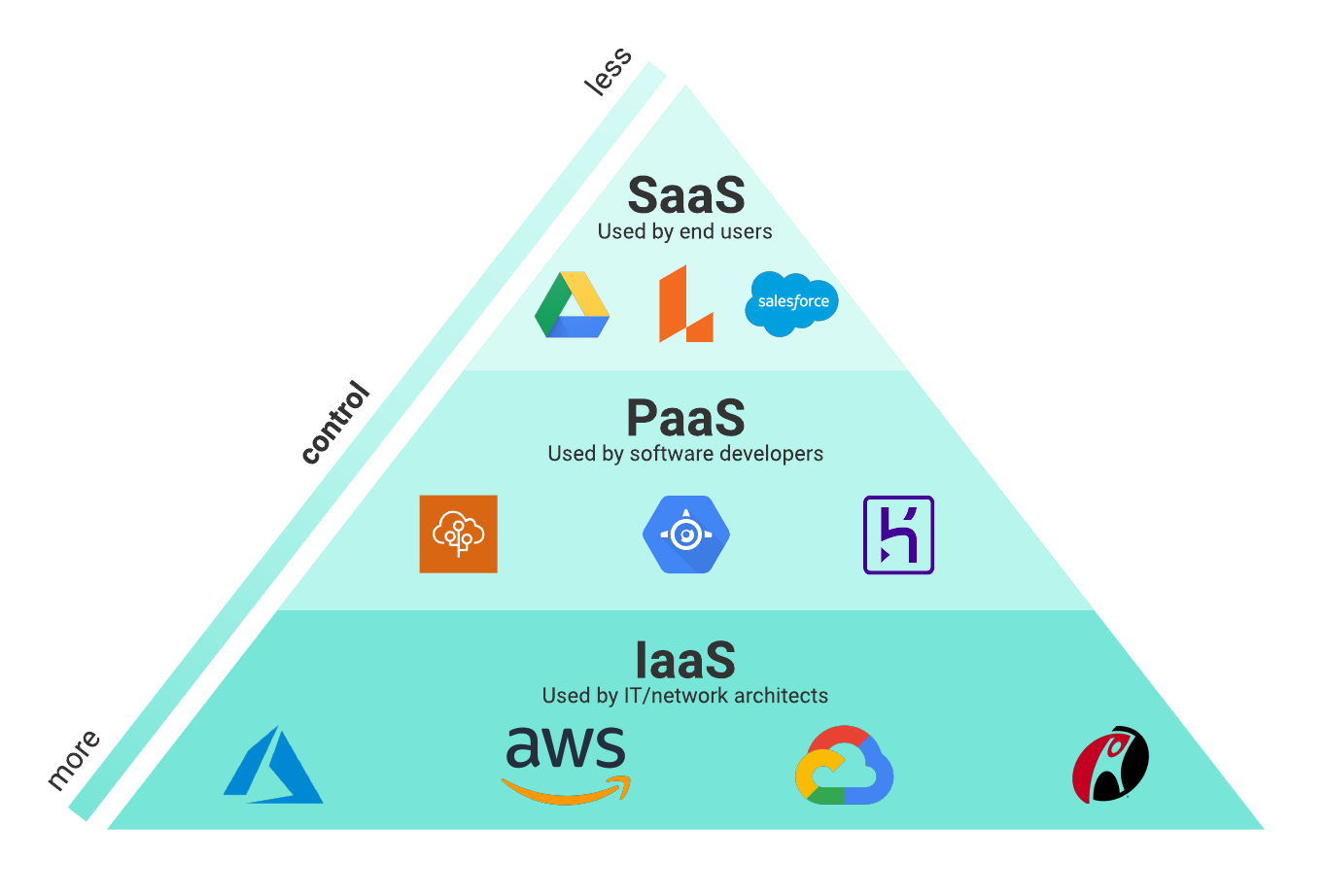
 Cloud solutions come in three primary service models: Infrastructure as a Service (IaaS), Platform as a Service (PaaS), and Software as a Service (SaaS).

cloud computing slanted control

IaaS

IaaS gives users access to storage, networking, servers, and other computing resources via the cloud. While the user is still responsible for managing their applications, data, middleware, etc., IaaS provides automated and scalable environments that provide a high degree of control and flexibility for the user.

For example, many businesses use IaaS to support workload spikes during busy seasons (like holidays).

Popular IaaS providers include:

  • Amazon Web Services (AWS)
  • Microsoft Azure
  • Google Compute Engine (GCE), the IaaS component of Google Cloud Platform (GCP)

PaaS

This service layer is primarily geared towards developers and operations professionals. Service providers rent out cloud-based platforms for users to develop and deliver applications. In other words, PaaS provides a framework that makes it easier and more efficient to build, customize, and deploy applications.

SaaS

Cloud application services are the most well-known of the cloud service models. The software is hosted, packaged, and delivered by a third party through the Internet (typically on a browser-based interface). By delivering the software application over the Internet, enterprises can offload the costs of management and maintenance to the vendor(s).

Popular SaaS options include email and customer relationship management software.

Questions for readers :

(Give your answers in the comment section below)

Question 1. Why Cloud Computing was developed ?

Question 2. Define the terms web page, website, browser & URL ?

Question 3. List the advantages of Cloud Computing ?

Question 4. Compare Wi-Fi & internet ?

Question 5. List the differences between wired & wireless networks ?

There is no correct or wrong answers for these questions. So you can give your answers in the comment session below and we will give ours in the next post.

Types of cloud computing

 There are three main cloud service options: private, public, and hybrid clouds. Each has its own advantages and disadvantages and which one you (or your business) choose will depend on your data as well as the level of security and management you need.

Public

A public cloud is probably the most commonly understood cloud computing option. This is where all the services and supporting infrastructure are managed off-site over the Internet and shared across multiple users (or tenants).

A good example of a public cloud at the individual consumer level is a streaming service like Netflix or Hulu. Users subscribe to the service through an individual account but access the same services across the platform through the Internet.

The advantage of using a public cloud is the increased efficiency and subsequent cost-effectiveness from shared resources. Public clouds are typically cheaper than private and hybrid cloud solutions (as well as traditional on-premise computing) because they rely on economies of scale. Users don’t have to pay for services they aren’t using and don’t have to worry about managing and maintaining the physical infrastructure.

Private

A private cloud provides IT services through the Internet or a private network to select users, rather than to the general public. Instead of having multiple tenants, like a public cloud does, a private cloud typically has only one tenant. All the data is protected behind a firewall. This is a popular choice for many businesses who want the agility of the cloud with greater customization and security.

Private clouds can reside on-site or off-site. The distinguishing feature is the single, private tenant who maintains greater control over the IT services. Private clouds are popular choices for organizations who have high priorities on security and compliance.

Hybrid

A hybrid cloud environment combines both private and public cloud elements to varying degrees. Despite operating independently, the clouds in a hybrid environment communicate over an encrypted connection and allow for the portability of data and applications.

This is an increasingly popular cloud solution because it allows organizations greater flexibility to meet their IT needs. 

How cloud computing works

 Cloud computing differs from traditional IT hosting services in that the consumer (whether that’s a business, organization, or individual user) generally doesn’t own the infrastructure needed to support the programs or applications they use.

Instead, those elements are owned and operated by a third party, and the end-user pays only for the services they use. In other words, cloud computing is an on-demand, utility-based model of computing.

Characteristics of cloud computing 

On-demand self-service

Users can access computing services via the cloud when they need to without interaction from the service provider. The computing services should be fully on-demand so that users have control and agility to meet their evolving needs.

Broad network access

Cloud computing services are widely available via the network through users’ preferred tools (e.g., laptops, desktops, smartphones, etc.).

Resource pooling

One of the most attractive elements of cloud computing is the pooling of resources to deliver computing services at scale. Resources, such as storage, memory, processing, and network bandwidth, are pooled and assigned to multiple consumers based on demand.

Rapid elasticity

Successful resource allocation requires elasticity. Resources must be assigned accurately and quickly with the ability to absorb significant increases and decreases in demand without service interruption or quality degradation.

Measured service

Following the utility model, cloud computing services are measured and metered. This measurement allows the service provider (and consumer) to track usage and gauge costs according to their demand on resources.

About Cloud Computing

 A physical site called a data center houses a common pool of computer resources (such as hardware, software, and services like servers and internet storage). Your cloud service providers have data centers all around the world.

Cloud computing is a methodology for providing on-demand network access to a shared pool of programmable computing resources that can be quickly supplied and released with no administration effort or service provider contact.
Cloud computing is an internet-based computing model in which several network connections and computer systems are used to provide online services. Users at a distance who have access to the internet can readily access the cloud and its services, and these services and information can be shared among several computers and users if they are all linked.

Types of Clouds

The four types of access to the cloud are public, private, hybrid, and community:

(a) Public Cloud: The public cloud makes it possible for anybody to access systems and services. Because of its openness, the public cloud may be less secure. The public cloud is one in which cloud infrastructure services are made available through the internet to the public or large industrial groups. The infrastructure in this cloud model is owned by the company that delivers the cloud service, not by the consumer.
Example: Microsoft Azure, Google App Engine

(b) Private Cloud: A private cloud is one in which cloud infrastructure is set aside for a single organization’s exclusive use. Organizations, third parties, or a mixture of both own, manage and operate it. In this architecture, the cloud infrastructure is provisioned on the organization’s premises but hosted in a third-party data center. Organizations will benefit from the private cloud over public cloud since it gives them more flexibility and control over cloud resources. Example: E-bay

(c) Hybrid Cloud: Hybrid cloud, as the name implies, is a blend of different cloud models, such as public cloud, private cloud, and community cloud. This model utilizes all the models that are a component of it. As a result, it will combine scalability, economic efficiency, and data security into a single model. The complexity of creating such a storage solution is a downside of this strategy.

(d) Community Cloud: The community cloud model distributes cloud infrastructure among numerous organizations to support a specific community with shared issues. Cloud infrastructure is delivered on-premises or at a third-party data center in this manner. Participating organizations or a third party manage this.